Lunar.dev MCPX Enterprise
Lunar MCPX Enterprise gives you centralized control and visibility over your teams' MCP traffic, balancing developer flexibility with enterprise-grade governance, auditability, and security. With MCPX Enterprise, you can standardize how MCP connections are created, authenticated, and monitored. Self-hosted in your Kubernetes cluster, on-premises, in your VPC, or air-gapped.
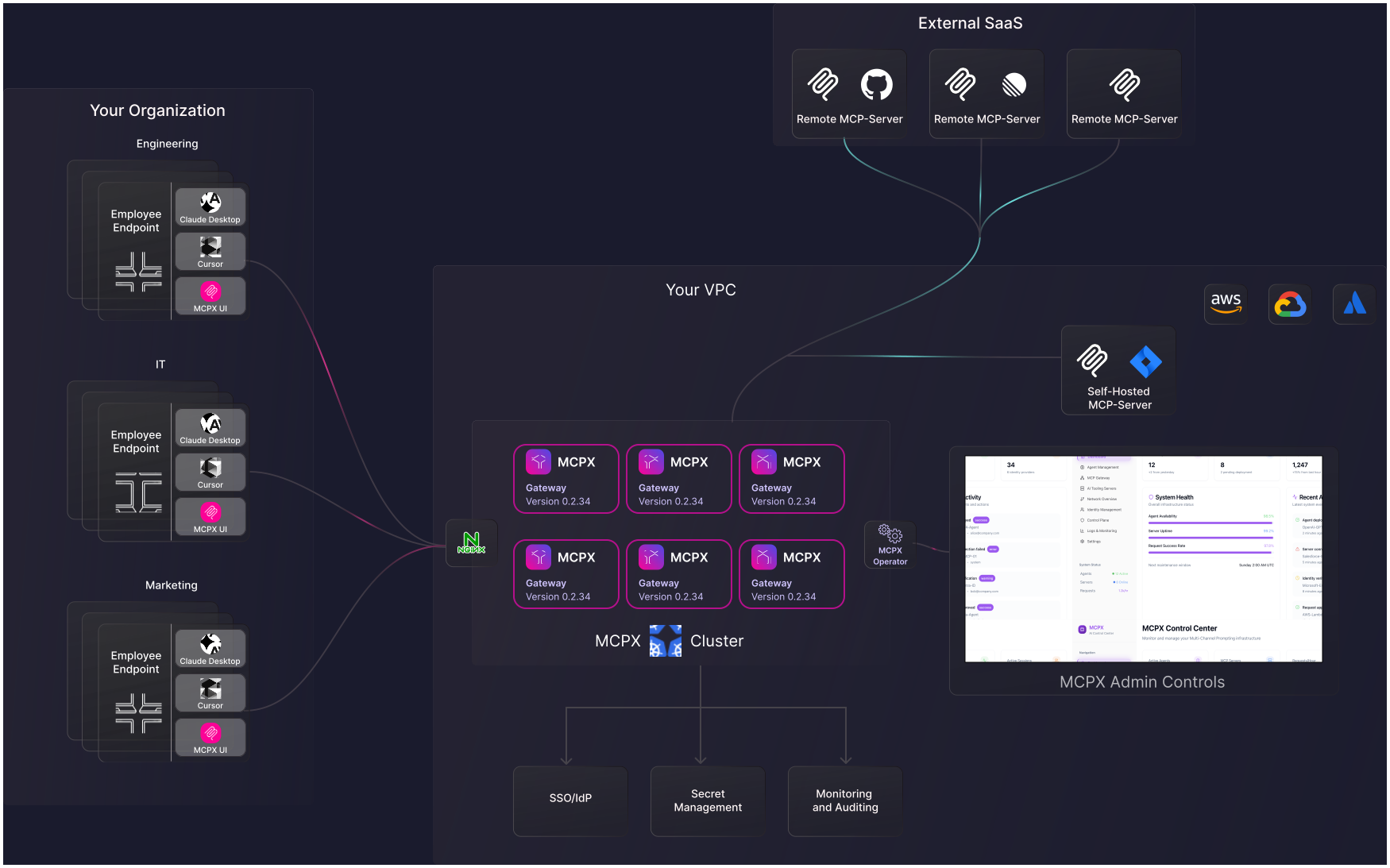
What MCPX Enterprise adds beyond open-source
MCPX Enterprise extends the open-source MCPX gateway with:
- Centralized MCPX Control Plane
- Cluster of gateways per identity
- Groups, Profiles, and centralized user management
- Organizational Catalog and Custom MCP Server Registry
- Hosted MCP
- Agent Inventory and Usage Dashboard
- MCP Evaluation Sandbox and Risk Scoring
- Full Auditability
- Secret Management
- In-Client Authentication
- Eco Mode and Saved Setups
- 24x7 SLA-backed support
Why use MCPX Enterprise
Managing AI agents, LLM integrations, and internal MCP servers gets complex fast. MCPX Enterprise gives platform and security teams a single control plane to govern connections, enforce policies, and monitor activity with full audit trails.
Use MCPX Enterprise when you need to align AI development speed with governance, compliance, and enterprise-grade security.
Enterprise Features
Infrastructure
- Centralized MCPX Control Plane. A single control plane for user management, role definition, authentication, and policy enforcement across the organization.
- Cluster of gateways per identity. Dedicated, isolated gateway instances per user or agent identity, deployed under the central control plane.
- Self-hosted Kubernetes deployment. Deploy in your VPC, on-premises, or air-gapped, across AWS, GCP, and Azure.
- Eco Mode. Automatically hibernate idle MCPX instances on a schedule to reduce Kubernetes resource usage while preserving configuration, OAuth tokens, and persistent storage.
Identity and Access
- Centralized User Management. Connect your identity provider for SSO and enforce access policies with verified identity context on every MCPX request.
- Groups. Map IdP groups to Profiles so team and role membership controls MCP access automatically as users join or leave groups.
- Profiles. Assign each team, role, or department a curated subset of approved MCP servers and tools from the Organizational Catalog.
MCP Management
- Organizational Catalog. Review and approve MCP servers in one curated list before they reach a Profile or a user.
- Custom MCP Server Registry. Private registry where administrators publish and control which MCP servers are discoverable across the organization.
- Hosted MCP. Deploy internal MCP servers as remote enterprise services on shared MCPX infrastructure.
- MCP Evaluation Sandbox. Isolated environment for testing MCP servers before production. Simulate workflows, inject failure scenarios, and tune behavior. Includes a formal approval workflow that promotes servers from sandbox to the production registry.
- Saved Setups. Snapshot the current MCPX configuration and restore it later to switch between projects or recover from changes quickly.
Agent Governance
- Agent Inventory. Centralized view of all deployed agents and their activity across teams, environments, and MCP servers. Monitor usage patterns and configure alerts for anomalous behavior.
- Autonomous Agent Support. Manage and govern non-human agent identities alongside human users.
- OpenAI Agent Builder Integration. Native integration with ChatGPT and OpenAI Agent Builder for secure access to all connected MCP servers.
- In-Client Authentication. Move OAuth re-authentication into the agent conversation so users sign in inline and the agent retries the original request.
Security and Compliance
- Full Auditability. Logs all model prompts and tool invocations with full identity context. Immutable audit trail for compliance.
- Secret Management. Store, rotate, and control secrets inside your infrastructure. Integrates with HashiCorp Vault.
- Usage Dashboard. Monitor MCP tool activity across your organization, including which users and agents are active, how often they call tools, and how often those calls fail.
- Risk Scoring. Evaluate the potential impact of MCP tools so security and platform teams can make informed decisions about which tools to approve, expose, and monitor.
Support
- 24x7 enterprise support. SLA-backed response times, dedicated onboarding, and architecture reviews.